

2.2. What Is Object-Oriented Programming?
Java is an object-oriented programming (OOP) language, so here we introduce some of the underlying concepts involved in object-oriented programming. We talk about what an object is, how objects are grouped into classes, how classes are related to each other, and how objects use messages to interact with and communicate with each other.
2.2.1. OOP Metaphor: Interacting Objects
A Java program, and any object-oriented program, is a collection of interacting objects that models a collection of real-world objects.
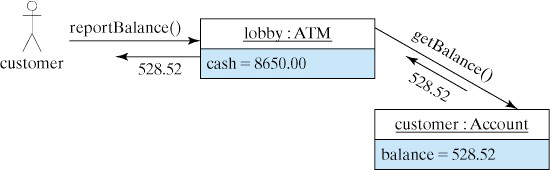
For example, in the ATM transaction pictured above, a customer uses an ATM machine to check their account balance. There are three entities involved: (1) the customer, (2) the bank machine, and (3) the customer’s bank account. If you were writing the Java program for the ATM machine, you would represent each of those entities as Java objects.
2.2.2. What is an Object?
So what is an object? Just as in the real world, an object is any thing
whatsoever. An object can be a physical thing, such as a Car, or a mental
thing, such as an Idea. It can be a natural thing, such as an Animal,
or an artificial, human-made thing, such as an ATM. A program that manages
an ATM would involve BankAccount and Customer objects.
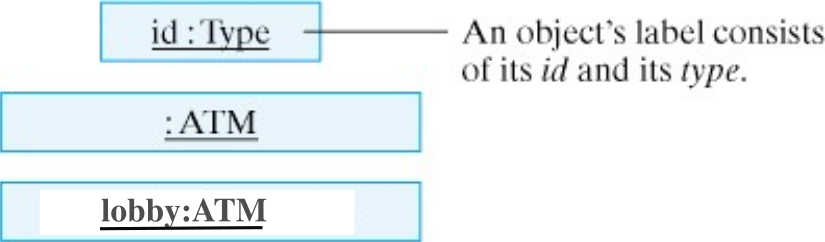
Some texts use the notation shown below to depict objects and to illustrate object-oriented concepts. The notation is known as the Unified Modeling Language (UML), and it is a standard in the object-oriented programming community.
Note
We won’t dive too much into the details of UML in this course, as we will use it mostly for high level visualization of objects and their relationships. You will see it in more detail in other courses like COMSC 225!
As the diagram shows, an object is represented by a rectangle whose label
consists of the object’s (optional) id and its type. An object’s id or variable name is the name by which it is referred to in the computer program. In this case, we show
an ATM object whose variable name is lobby.
2.2.3. Attributes and Values
Just as with real objects, the objects in our programs have certain
characteristic attributes. For example, an ATM object would have a
current amount of cash that it could dispense. A Customer object would have a name, address, and account number.
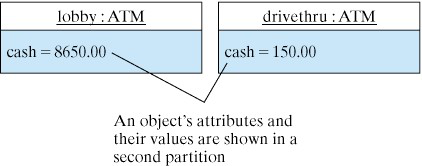
The figure below shows two ATM objects and their respective
attributes. An object’s attributes are listed in a second partition of the box for the object. Notice that each attribute has a value. So the lobby:ATM has
$8650.0 in cash, while the drivethru:ATM has only $150.0.
We sometimes refer to the collection of an object’s attributes and values as
its state. For example, the current state of the lobby:ATM is $8650.0
in cash. The key thing here is that even though lobby and drivethru are both ATM objects, they have different values for their cash attribute.
2.2.4. Actions and Messages
In addition to their attributes, objects also have characteristic actions or behaviors. Objects do things or have things done to them. Programming in Java is largely a matter of getting objects to perform certain actions for us.
For example, when a customer pushes the “Current Balance” button on an ATM machine, this is telling the ATM to report the customer’s current bank balance. This is represented in the figure below by the arrow between the customer and ATM objects. In respose to the button-press the ATM object sends a “get balance” request to the customer’s account object, which returns the value 528.52. The ATM object then displays this value to the customer.
In this way, the actions associated with an object can be used to send messages to the objects and to retrieve information from objects. Responding to a message or performing an action sometimes causes a change in an object’s state. For example, if the ATM customer requested a $20 withdrawal, their bank account’s balance would be reduced by $20. On the other hand, some messages (or actions) leave the object’s state unchanged. Reporting the customer’s bank account balance doesn’t change the balance.
2.2.5. What is a Class?
A class is a template for an object. A class encapsulates the attributes
and actions that characterize a certain type of object. Both the lobby and drivethru ATMs are of the ATM class.
In an object-oriented program, classes serve as blueprints or templates for the objects that the program uses.
We say that an object is an instance of a class. A good analogy is to think of a class as a cookie cutter and its objects (instances) as individual cookies. Just as we use the cookie cutter to stamp out cookies of a certain type, in an object-oriented program, we use a definition of a class to create objects of a certain type.
Writing an object-oriented program is largely a matter of designing classes and writing definitions for those classes in Java. Designing a class is a matter of specifying all of the attributes and behaviors that are characteristic of that type of object.
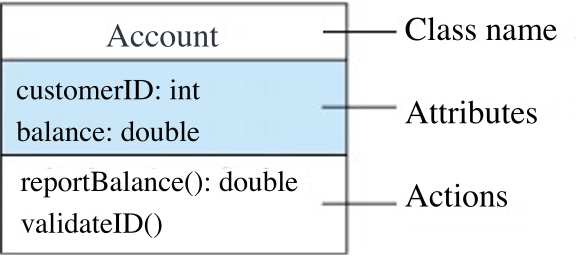
The figure above shows the UML diagram for the Account class. Our Account objects will have two attributes: customerID and balance and they can perform two actions: validateID() and reportBalance(). Note that this is still the blueprint for the Account class, and the attributes have no values. Only the class’s objects, its instances, will have values for these attributes.
2.2.6. Variables and Methods
Up to this point we have been using the terms attribute and action to describe an object’s features. When talking about a programming language, the more common way to describe an object’s features is to talk about its variables and methods.
A variable, which corresponds to an attribute, is a named memory location
inside the computer that can store a certain type of value. For example, as shown in the Figure above, customerID is a variable that can store whole number (int) values, such as 10094 and balance is a variable that can store decimal (double) values, such as 582.74.
A method, which corresponds to an action or a behavior, is a named chunk of
code that can be called to perform a certain pre-defined set of
actions. For example, as its name suggests, the reportBalance() method reports the customer’s account balance.